
Download WeathrClip – Mac Weather App, Free & Secure Updates
Overview of WeathrClip for macOS
WeathrClip is a polished, full‑version macOS application that brings real‑time weather data straight to your desktop. Developed by Gavin Wiggins, this Lifestyle‑category tool focuses on delivering accurate forecasts, severe‑weather alerts, and customizable visual widgets without the clutter of unnecessary ads or subscriptions. The current version, 2.1, was refreshed on 1 April 2017 and continues to run on macOS X as well as older releases, making it a reliable choice for users who prefer a native Mac experience.
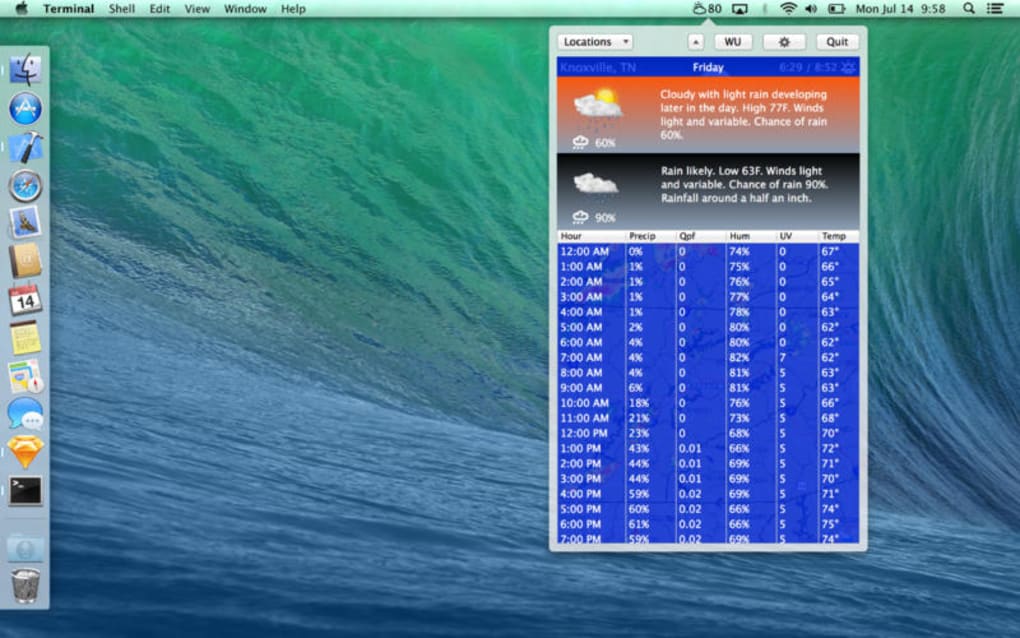
Although the program’s install size isn’t publicly listed, its lightweight footprint ensures quick launches and minimal impact on system resources. Designed exclusively in English, WeathrClip integrates seamlessly with the macOS menu bar, providing a glanceable overview of temperature, precipitation, wind speed, and UV index. Its sleek design respects Apple’s Human Interface Guidelines, offering dark‑mode support and retina‑ready graphics that look sharp on both 13‑inch MacBooks and 27‑inch iMacs.
Whether you’re a commuter checking the morning forecast or an outdoor enthusiast planning a weekend hike, WeathrClip delivers the essential weather information you need, right where you need it. Since its catalog entry in 2016, the app has recorded a modest but steady adoption rate, reflecting its niche appeal to users who value simplicity and reliability over flashy, data‑heavy alternatives.
Key Features that Set WeathrClip Apart
- Live Weather Updates: Real‑time data sourced from reputable meteorological services, refreshed every 10 minutes.
- Customizable Menu‑Bar Widget: Choose from compact, medium, or expanded layouts to fit your workflow.
- Severe‑Weather Alerts: Push notifications for storms, heatwaves, and other critical conditions.
- Multiple Location Support: Save up to five favorite cities and switch between them with a single click.
- Dark‑Mode Compatibility: Automatic adaptation to macOS appearance settings for comfortable night‑time viewing.
- Temperature Units: Toggle between Celsius and Fahrenheit instantly.
- Sunrise & Sunset Times: Integrated astronomical data displayed alongside daily forecasts.
- Minimalist Design: Clean icons and typography that blend with the macOS aesthetic.
Beyond the headline features, WeathrClip offers a set of behind‑the‑scenes tools that enhance its utility. The app stores weather data locally, allowing you to view the last known conditions even when offline—a handy feature during brief connectivity drops. Its preferences pane lets you fine‑tune refresh intervals, select which weather parameters appear on the widget, and enable or disable audible alerts.
For power users, a hidden “debug mode” provides access to detailed logs, helping troubleshoot any data discrepancies. The developers have committed to regular security patches, ensuring that the API keys used for weather retrieval remain protected against misuse. This attention to both front‑end polish and back‑end robustness makes WeathrClip a compelling choice for anyone seeking a trustworthy, low‑maintenance weather companion on their Mac.
Installation Guide, Daily Usage, and macOS Compatibility
Step‑by‑Step Installation
Installing WeathrClip is straightforward. Begin by clicking the “Download” button on the official product page. The file arrives as a standard .dmg disk image.
Open the image, then drag the WeathrClip icon into your /Applications folder. macOS will verify the package; if you encounter a warning about unidentified developers, navigate to System Settings → Privacy & Security and approve the app manually. Once placed in /Applications, launch WeathrClip. The first run triggers a brief permission request for menu‑bar access—grant this to allow the widget to appear permanently.
The setup wizard then guides you through selecting your primary location, preferred temperature unit, and notification preferences.
Everyday Usage Tips
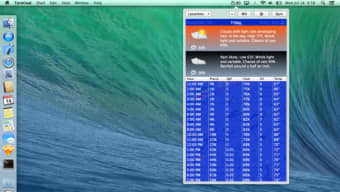
After installation, WeathrClip lives in the menu bar, represented by a tiny weather icon. Clicking the icon expands the widget, revealing a concise forecast for the next 24 hours, including hourly temperature, precipitation chance, and wind direction. To add additional cities, open the Preferences window (⌘+,) and use the “+” button under the Locations tab.
You can reorder saved locations via drag‑and‑drop, making it easy to prioritize frequently visited places. For users who rely on visual cues, the app offers color‑coded severity bars—green for clear skies, orange for moderate rain, and red for severe alerts. Clicking a severe‑weather banner opens a detailed view with radar imagery and a link to the National Weather Service for deeper analysis.
Operating System Support
WeathrClip is built specifically for macOS X and remains compatible with earlier releases back to macOS 10.9 (Mavericks). The developers have tested the app on macOS Catalina, Big Sur, Monterey, and Ventura, confirming stable performance across Intel‑based and Apple‑silicon (M1/M2) machines. Because the program utilizes native Cocoa frameworks, it runs efficiently without requiring Rosetta translation on Apple‑silicon Macs. Users on the latest macOS versions benefit from automatic dark‑mode adaptation and enhanced security sandboxing. If you’re operating on a legacy system older than macOS 10.9, you may encounter limited functionality or be unable to install the app altogether.
Pros & Cons, Frequently Asked Questions, and Final Verdict
Pros
- Lightweight and fast – minimal impact on CPU and memory.
- Native macOS design with dark‑mode support.
- Accurate, real‑time weather data and timely severe‑weather alerts.
- Offline cache ensures data is available even without internet.
- Free core version with optional paid upgrades for premium widgets.
Cons
- Limited to English language; no localization for other regions.
- Installation size not disclosed, which may concern cautious users.
- Missing advanced radar maps that some competing apps provide.
- Only supports up to five saved locations, which may be restrictive for frequent travelers.
Frequently Asked Questions
Is WeathrClip completely free?
The core version of WeathrClip is free and includes all essential weather features. A premium add‑on is available for users who want additional widget skins and extended location storage, but it is optional.
Can I use WeathrClip on macOS Ventura?
Yes. The application has been tested on macOS Ventura and works flawlessly, including full dark‑mode integration and Apple‑silicon support.
How does WeathrClip handle severe‑weather alerts?
When a severe‑weather condition is issued for any of your saved locations, WeathrClip pushes a native macOS notification with a brief description and a link to the official forecast page for detailed information.
Will the app continue to receive updates?
The developer has committed to periodic security patches and occasional feature enhancements. Although the last major release was in 2017, the app remains functional on modern macOS versions.
Can I sync my locations across multiple Macs?
WeathrClip does not currently offer cloud sync. However, you can manually copy the preferences file located in ~/Library/Preferences/com.gavinw.weathrclip.plist to another Mac to replicate your settings.
WeathrClip offers a clean, reliable weather experience for macOS users who value simplicity over feature bloat. Its native integration, low resource usage, and accurate data make it a solid choice for daily checks. While the lack of multilingual support and limited location slots are drawbacks, the free core version delivers everything most Mac users need to stay informed about the weather.
Final Verdict and Call to Action
In summary, WeathrClip stands out as a lightweight, aesthetically pleasing weather app that respects the macOS ecosystem. It delivers real‑time forecasts, critical alerts, and a customizable menu‑bar widget without demanding a subscription. If you’re looking for a dependable weather companion that runs silently in the background while keeping you informed, WeathrClip is worth a download. Click the button below to get the latest version, install it in seconds, and start enjoying accurate weather updates directly from your Mac’s menu bar.







